Live Price Indicators
Every player card in the Web App gets a live market-value badge — in your club, inside packs as you open them, on the transfer list, and on SBC squads. No more tabbing out to price-check a pull.
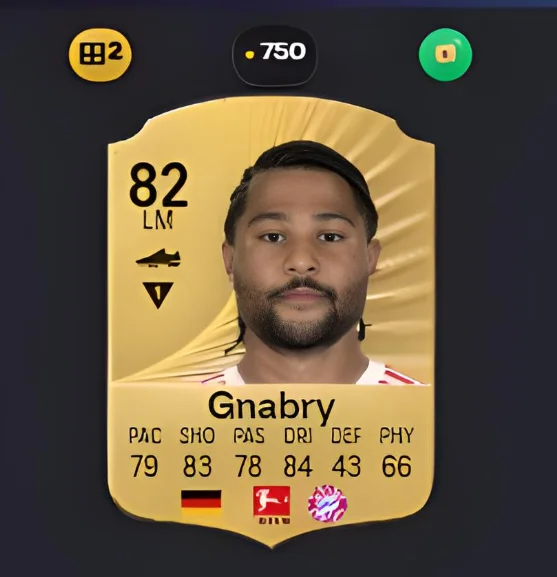
The information the game does not give you
A card in Ultimate Team has a rating, a club, a league and a nation printed on it. What it is worth is not printed anywhere. To find out you leave the screen, search the market, filter to the right version, and read the cheapest listing — which takes long enough that almost nobody does it in the moment that matters.
So decisions get made on instinct. A gold card looks like a gold card, and the difference between one worth 800 coins and one worth 80,000 is invisible until you have already quicksold it.
Prices that are actually current
The badges show what the card is listed at right now, taken from the live market rather than a stored figure. This distinction matters more in Ultimate Team than in most games: prices move on promo announcements, on content drops, on a player being added to an SBC. A number from last week can be wrong by an order of magnitude, and a wrong number confidently displayed is worse than no number at all.
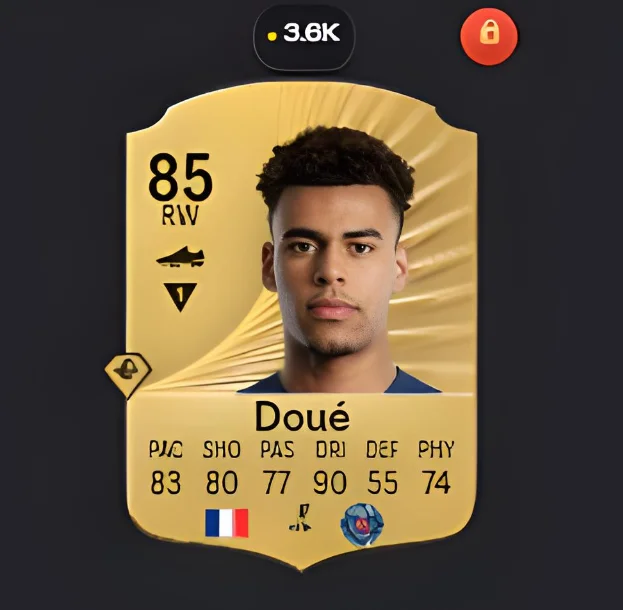
Where the badges appear
- While opening packs — the moment of highest risk, since quicksell is one tap away.
- In your club, when deciding what to sell or spend.
- On the transfer list, so you can see whether your asking price is sensible.
- On squads placed for a challenge, so you can see the true cost of a solution before submitting it.
Untradeable cards are marked as untradeable rather than given a price. A card you cannot sell has no market value to you, and showing one would only mislead.
What it changes in practice
The most common use is negative: not selling something. A card you were about to quicksell for a few hundred coins turns out to be worth thousands, you notice, and you list it instead. That single catch tends to pay for the habit several times over across a season.
The second use is on SBC squads. Seeing the market value of the eleven cards a challenge is about to consume turns an abstract decision into an actual price, and quite often the answer is that the reward is not worth it.
Turning them off
Sometimes you just want to look at your club. The Show/Hide Prices toggle in the club widget switches every badge off and back on, and it is worth using rather than tolerating a cluttered view — the feature is more useful when you turn it on deliberately than when it is always there.
What a price badge cannot tell you
It shows the cheapest listing, which is not quite the same as what the card will sell for. A card listed low may be underpriced by someone in a hurry, and a thin market can move the moment two people buy. Treat the number as a good current reading rather than a guaranteed sale price.
It also says nothing about whether a card is worth keeping. Plenty of cards are worth more to you as challenge fodder than their market price suggests, particularly untradeable ones, which have no market price at all and are often the most useful cards you own.
Using it, step by step
- Install FC Helper. Price badges appear automatically on player cards across the Web App.
- Open packs or browse your club. Each card shows its current market value as a coin badge.
- Toggle as needed. Use Show/Hide Prices in the club widget to switch the badges off and on.
Frequently Asked Questions
Where do the prices come from?
The live transfer market, meaning what the card is actually listed at right now rather than a figure from a database that was accurate last week. Prices in Ultimate Team move quickly, and a stale number is often worse than no number.
Does a price badge appear on every card?
On player cards throughout the Web App — your club, packs as you open them, the transfer list and squads on the pitch. Untradeable cards show as untradeable rather than showing a price, because they cannot be sold at any price.
Can I turn the badges off?
Yes. A Show/Hide Prices toggle in the club widget switches them off when you want a clean view, and back on when you need them.
Does seeing prices slow the Web App down?
The badges are added to cards you are already looking at, so the pages you use behave as they normally do.
Why does this matter most while opening packs?
Because that is where cards are lost. Quicksell is one tap away and a valuable pull looks like any other gold card until you check it. A badge on the card at the moment it lands is the difference between noticing and not.
See also: Quick List at market price, opening packs in bulk, and duplicate detection. Every feature is listed on the features overview.
Try FC Helper Free