In FC 27 more of your cards have a use. Streamlined SBCs take Player Items for their Item Score, duplicates included, and the Gallery counts cards even after you sell them. So store or keep untradeable fodder, list tradeable cards worth more than a quick sell, and quick sell only what no challenge or Set needs. If you get one wrong, Quick Sell Recovery can undo it within EA's limits.
How to recover a quick sold card in FC 27
These are the steps on EA's Quick Sell Recovery page, as it read on 30 October 2026. It works in the Web App and the Companion App:
- Log in to the EA SPORTS FC Web or Companion App.
- Select Club.
- Select Quick Sell Recovery.
- Use the calendar icon to find the day you quick sold the item.
- Select the Player Item you want to recover.
- Select Recover.
The card comes back under Unassigned Items, and EA deducts the coins you got when you quick sold it. You can then assign it from the Store or Home screen.
Quick Sell Recovery limits
- Seven days. You have up to seven days after the quick sell to get the item back.
- Five recoveries. EA allows five per 31-day period, and unused ones do not roll over. EA says its advisors cannot reset the timer or add more.
- Enough coins. You need at least as many coins in your Club as the quick sell gave you, because EA deducts them when the card returns.
- Player Items only. Other items cannot be recovered, nor can Loan Player Items, and recovery works only for the current version of FC.
FC Helper's Transfer List window asks you to confirm before it quick sells cards, and shows the coins you get. The recovery limits above are EA's, so still check a card's price and Item Score before you quick sell it.
Why is fodder worth more this season?
Two FC 27 changes:
- Streamlined SBCs. EA plans to use them for "the majority of Player and Upgrade SBCs". They ask for a total Item Score, take duplicates and several versions of the same player, and save partial progress. A card whose rating fit no squad now adds score.
- The FUT Gallery. Cards count toward Sets, and EA says items you sold or submitted into an SBC "can still contribute to Gallery Sets". The cards you pack carry Gallery value on top of their SBC value.
Item Score rises with rating, with rarity and Holographic bonuses that stack (EA, FC 27 Launch Update). EA doesn't publish the score per rating, so check a card's score rather than guess. Our Streamlined SBC guide shows how to compare score per coin.
Keep, store, list or quick sell?
Run each new card through this table, top row first:
| Card | What to do | Why |
|---|---|---|
| A Set still needs it | Add it first | Gallery value |
| Untradeable duplicate | SBC Storage | Scores in SBCs |
| Untradeable, not for your team | Keep for SBCs | No coins to lose |
| Tradeable, untradeable twin owned | Swap, then list | Keeps the free copy |
| Tradeable, worth more than quick sell | List it | Coins beat quick sell |
| No SBC, Set or market value | Quick sell | Last resort |
The table goes by what a card is, not by its rating, because the ratings worth keeping move with the market. Before you quick sell a gold card, check its price and its Item Score.
Where do untradeables and duplicates go?
Untradeable cards can't earn coins on the market, so their value is in challenges. Duplicates of cards you already own are the most common kind:
- SBC Storage. EA introduced it in FC 25 for untradeable duplicate players, with room for up to 100 items and a tab in every SBC to recall them. EA hasn't restated the capacity for FC 27, so check yours in the game.
- Straight into a Streamlined SBC. Duplicates are allowed and partial progress is saved, so a duplicate can go into a running Streamlined SBC at once.
- Swap with a tradeable copy. If the copy in your club is tradeable and the new one isn't, keep the untradeable one in the club and list the tradeable one.
A duplicate is the same card version: a Team of the Week card and the same player's base card are not duplicates of each other. For the habits that hold every season, see how to manage fodder and duplicates.
When is a card worth listing instead?
A tradeable card whose lowest Buy Now price is clearly above its quick sell value is worth listing, even after the market's tax. Before you list:
- Look up the lowest Buy Now for that exact card version.
- Price it just under that, so it sells.
- If it doesn't sell, relist once or twice, then decide again: SBC, Set or quick sell.
Quick Sell Recovery: what can you undo?
FC 27 has Quick Sell Recovery, which lets you take back a quick sell within limits that EA sets out on its help page. Read EA's Quick Sell Recovery rules before you rely on it: it is a backstop for a mistake, not a reason to quick sell first and think later.
And before you quick sell a packed card, check whether a Gallery Set still needs it. Our Gallery Sets and tokens guide explains what counts.
Set the rules once for every pack with FC Helper
FC Helper is an independent browser extension for the EA FC Web App, not made or approved by EA. Instead of deciding card by card, you decide once:
- Badges on every card (free): price, duplicate, tradeable and score, in packs, in Unassigned and in your club.
- Auto actions (free): on My Packs, pick a rule for duplicates, tradeable and untradeable, players and consumables apart: Smart, List, Transfer, Quick Sell, Keep, Storage or Swap. New cards go to your club.
- Smart lists a tradeable duplicate priced above your Min sell price and quick sells the rest.
- Unassigned in a few presses (free): To SBC Storage, Swap, To Club and List on Market each act on a whole section.
- Quick open (free, 50 a day) opens one pack without the slow reveal. Open all packs (Premium) opens a stack with your rules applied to every card, and the results show where each item went.
- The club sheet (free): on the game's Home, press the Club count on FC Helper's club bar. Filters show only your tradeable, untradeable or storage cards, each with its price, so you see what to list and what to keep for SBCs.
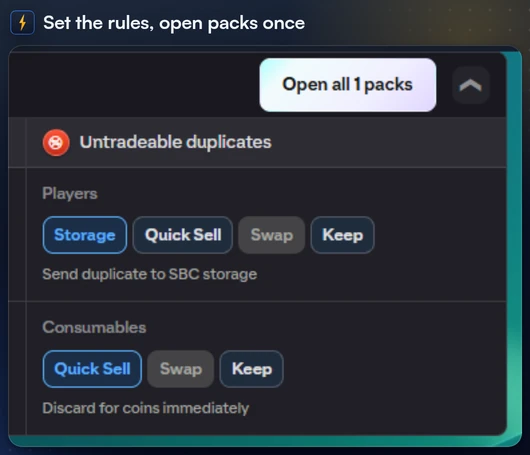
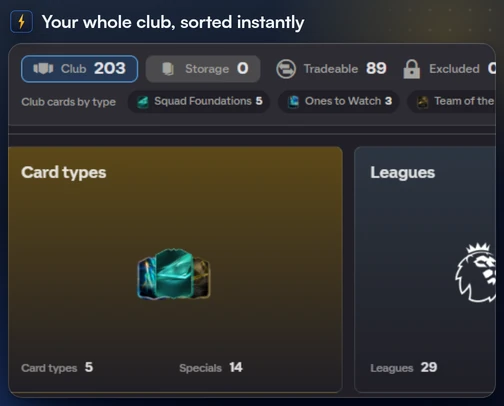
See Auto actions, Duplicates, Open All Packs and the club sheet on the Features page, and our guide to opening packs faster.
Every Web App extension carries a ban risk, FC Helper included. Read our honest take on solver ban risk before you use one.
Frequently Asked Questions
Should I quick sell fodder in FC 27?
Rarely first. Streamlined SBCs take duplicates and save partial progress, and the Gallery counts cards you have owned, so store or submit untradeable fodder and list tradeable cards worth more than a quick sell.
What goes in SBC Storage?
Untradeable duplicate players you plan to use in SBCs. It holds up to 100 items.
Are a TOTW card and the base card duplicates?
No. A duplicate is the same card version, so a Team of the Week card and the same player's base card aren't duplicates of each other.
Do duplicates count in Streamlined SBCs?
Yes. Streamlined SBCs allow duplicates and several versions of the same player.
Can you undo a quick sell in FC 27?
Yes. Quick Sell Recovery returns a quick sold Player Item from Club, Quick Sell Recovery, within seven days, up to five times per 31-day period. EA deducts the coins you were paid.
How do I do Quick Sell Recovery in FC 27?
Log in to the Web App or Companion App, select Club, then Quick Sell Recovery, find the day on the calendar, select the Player Item and select Recover. It returns under Unassigned Items.
How long do I have to recover a quick sold player in FC 27?
Seven days from the quick sell, and only for the current version of FC.
Can I recover a quick sold loan player or consumable?
No. Only Player Items can be recovered, and quick sells of loan players can't be undone.