SBC Storage is a separate place for untradeable duplicate players you plan to use in Squad Building Challenges. Instead of quick selling a duplicate, you send it to storage and pick it from the SBC Storage tab when you build a squad. EA introduced it in FC 25 with room for up to 100 items and has not published an FC 27 figure.
This guide covers EA SPORTS FC 27 and was checked against EA's own pages on 25 October 2026. When the game shows something different, the game wins.
What is SBC Storage?
"SBC Storage gives you a place to keep duplicate untradeable Player Items that you may want to use in an SBC."
A duplicate is a player card you already own. When an untradeable copy arrives from a pack or a reward, you can't list it, so your choices are to quick sell it, use it straight away or keep it for later. Storage is the "keep it for later" option, and it is the one that saves you coins when the next challenge needs exactly that rating.
How many cards does SBC Storage hold?
When EA announced storage for FC 25, it gave a number:
"In FC 25, we're introducing a storage system for Untradable Duplicate Players. You can send and keep up to 100 items in your SBC storage, and easily recall these players from a new tab in every SBC."
EA's FC 27 help page on SBCs does not mention a capacity, and we found no FC 27 figure from EA as of 25 October 2026. Treat 100 as the number EA gave at launch, not a promise for this season, and check how full your own storage is before a big pack session.
What should you put in SBC Storage?
EA's wording sets the limits: duplicates, untradeable, players. Within that, store what you will really use:
- Duplicates at the ratings SBCs keep asking for. Squad-rating challenges are where rated duplicates save the most coins; our guide to cheap rated squads explains how the rating adds up.
- Special versions. FC 27's score-based SBCs give each player an Item Score from its OVR, raised by Rarity and Holographic bonuses that stack (EA, FC 27 Launch Update Pitch Notes), so a rare or special duplicate is worth more there than a common one of the same rating. Our Streamlined SBC guide covers how scores work.
- Not tradeable copies. A tradeable duplicate can earn coins on the market. See how to price and list what you own.
How do you use stored cards in SBCs and Streamlined SBCs?
In a classic squad SBC, which EA's help now calls a Puzzle SBC, open the challenge and switch to the SBC Storage tab while you build the squad. EA's help page says the tab only shows when you have something stored, and its own tip is to "check your Club and SBC Storage before getting Player Items." Start there before you buy anything.
FC 27 adds score-based challenges, which EA's Pitch Notes call Streamlined SBCs and EA's help calls Simplified SBCs. You add eligible players until their Item Scores reach the target, and EA says duplicates and several versions of a player are allowed. EA's FC 27 help section doesn't say whether stored cards appear in that picker, so check the challenge screen in your game.
Either way, submitting is final. EA's help page: "SBC submissions are final, and EA Advisors can't restore submitted Player Items." A stored card used in a challenge is gone for good, so look at what you are adding before you confirm.
What happens when SBC Storage is full?
EA's pages don't say what happens to the next duplicate once storage is full. Plan as if it cannot go in: it stays waiting for you to quick sell it, use it or make room. The easy way to avoid that is to empty storage into SBCs before a promo or a reward day, when packs and duplicates arrive together. Our guide to managing fodder and duplicates covers the whole cycle.
A weekly SBC Storage routine
- Check the count before you open your weekly rewards.
- Spend stored cards first. Open a repeatable SBC or an upgrade SBC you want anyway and fill it from the SBC Storage tab before touching your club or the market.
- Store, don't quick sell, the untradeable duplicates you will use, and quick sell the ones you won't. Our guide to what to keep, store or quick sell helps you decide.
- Leave room before big pack days. A storage you emptied on Thursday has space for whatever the weekend's packs bring.
Ten minutes a week keeps storage working as a fodder reserve instead of a full box you forget about.
See your storage at a glance
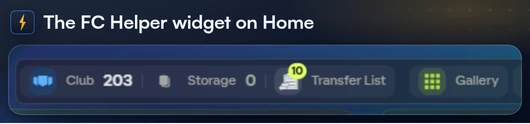
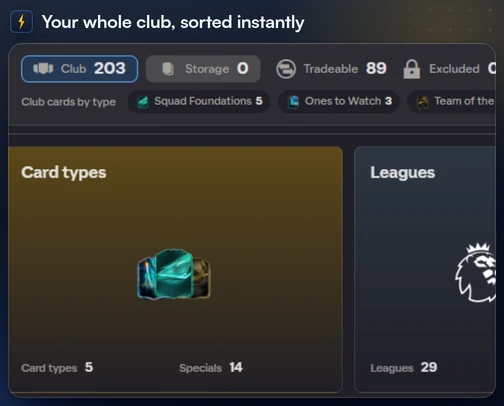
If you use FC Helper in the Web App, the club bar on Home shows your Club and Storage counts side by side, and the Storage count greys out when storage is empty. Press the counts to open the club sheet, where one filter shows only your storage cards. See the club bar on the Features page.
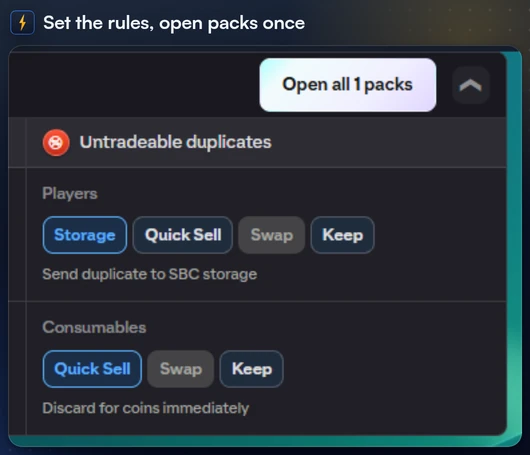
When you open packs through FC Helper, the Auto actions card in My Packs sets where untradeable duplicates go, and Storage is one of the choices. If storage fills up, FC Helper says so ("SBC Storage is full") instead of leaving you to discover it, and the duplicates stay unassigned for you to decide. In the unassigned pile, To SBC Storage sends the duplicates there in one press.
When you press Find Squad on an SBC, FC Helper can fill the squad from your stored cards too. The squad panel's SBC Storage option (Include, Only or Exclude) decides whether it does, for a single solve and for Batch and Set runs. A single solve stops for you to press Submit; Batch and Set submit every challenge they fill, so set it before you start.
Every Web App extension carries a ban risk, FC Helper included. EA's FC rules advise players to avoid browser extensions and forbid automation and auto-buyers. Read our honest take on solver ban risk before you use one.
FAQ
Frequently Asked Questions
How many cards can SBC Storage hold in FC 27?
EA said up to 100 items when it introduced SBC Storage in FC 25 (FC 25 Community Update, 18 July 2024). EA has not published a figure for FC 27 on the pages we read on 25 October 2026, so treat 100 as the launch figure, not a promise for this season.
What can go into SBC Storage?
EA describes it as a place to keep duplicate untradeable Player Items that you may want to use in an SBC. Tradeable duplicates are better listed on the Transfer Market.
Where do I find my stored cards?
Inside an SBC, open the SBC Storage tab while you build the squad. EA says that if you don't see the tab, you have no Player Items stored there.
Do I get a stored card back if I submit it to an SBC?
No. EA's help page says SBC submissions are final: submitted Player Items are permanently removed from your club and EA's advisors cannot restore them.